


 0477 726 726

 Worldwide (All)

October 2026 FAQ's Need more help? Contact Factory | Let Us Design
- Intro to FAQ's
- Prepare & Create
 The Easy Template Maker
- What is Material Over Size and why do I need it?
- Sewing Positions?
- How do I supply artwork?
- IMPORTANT
What does 'banner print ready' mean? - Do I supply trim bleed?
- What file formats can I use?
- Where do I find the Set Up Specifications?
- Do you have a dropbox? Can I send you files?
- I'm not a graphic designer... what do I do?
- I have some elements... can you put it together for me?
- What should I tell MY designer?
- Each Product
- Order & Upload
- What's next?
- ReSellers
 FAQ's - In a few minutes you will be able to customize any printed banner, sign or display suited to your clients demands.
Navigate through a few pages and learn how you can create customized printed banners and display signage products for your business customers. It's Easy!
The Easy Template Maker. Why we use & recommend it!
It gives you correct manufacturing sizes for making and printing a banner sign.
IMPORTANT The Easy Template Maker gives you best specifications.

 We now use and recommend the Easy Template Maker for all custom sizes and options. Free!
The Easy Template Maker shows you the manufacturing artboard size, the fold over bleed needed, the finish size dimensions, recommended dpi and color mode. MORE INFO
Now used over 16,169 times. You can use it too!
How to use The Easy Template Maker
Generate
Custom options and Generate, then download.
Open
Open in a graphics program, Overlay your creative.
Print Ready
Your order matches the specifications needed to manufacture.
What is an Easy Template?

An Easy Template is a downloadable PDF file that you can use to MANUFACTURE large banner signs. It shows you the fold over bleed needed, finished size and safety graphic area. Then, you can send your order to a printing company for manufacturing.
Use it for: Understanding the file needed for banner sign printing.
Use it for: Overlaying your creative and uploading to a banner sign printing company.
Use it for: Pole Pocket positioning, hemming and 'fold over bleed' requirements suited to your custom order.
Tip: Use it WITH the INFO SHEET for you or another designer to complete.
Also see: What is banner print ready artwork?
Also see: Is my file suitable?
Can I scale 50%, 25% or change resolutions?
Sometimes! If your banner size is HUGE, some software limitations may be applied. We use and recommend the Easy Template Maker. The Easy Template Maker will tell you the best 'downsize' to use. Please keep in mind that SCALED down proportions must be correct for automatic processes to begin.
Downscaling files. Your best results are when you design 100% at full size 72dpi.

Also see: What is banner print ready artwork?
Also see: Is my file suitable?
I have downloaded a template... now what do I do?
Open the Easy Template in your graphics program (Photoshop, Illustrator, Corel etc). The template shows the manufacturing artboard size with fold over bleed, finished size zone and safety graphics area.
1. Place your design elements on top of the template layers.
2. Keep all important graphics inside the safety zone.
3. Flatten all layers.
4. Save as a single PDF at 72dpi CMYK.
5. Upload at Order & Upload.
Also see: What is banner print ready artwork?
What is an INFO sheet?
An INFO sheet is a printable specifications sheet generated by the Easy Template Maker. It contains the exact manufacturing dimensions, dpi, color mode, file format requirements and sewing positions specific to your custom order choices.
Use it to brief your designer or keep as a reference when setting up your artwork file.
Also see: Easy Template Maker
Also see: Artwork Specifications
I'm not a graphic designer... what do I do?
No problem! We offer two options:
Let Us Design - Send your logo, photos and instructions to our design team. We create the banner print ready file for you.
Designers Near You - Find a local designer to work with.
I have some elements... can you put it together for me?
Yes. Use our Let Us Design dropbox to attach and send your elements - logos, photos, fonts, or any other creative assets - along with your brief and instructions.
Our design team will assemble your banner print ready file and reply to you soon.
Let Us Design
Also see: Do you have a dropbox?
The best way to setup files is using The Easy Template Maker.
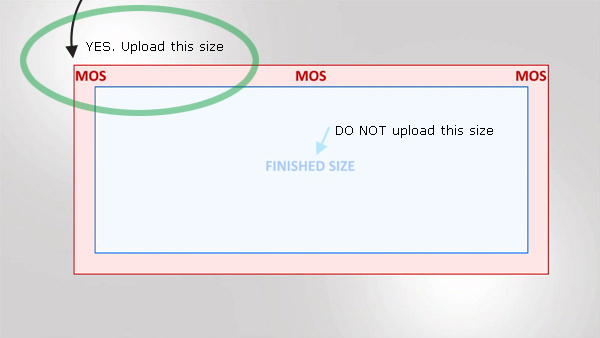
'Fold Over' Bleed = 'Material Over Size'
- The hem is folded over and sewn.
- This fold over bleed is called Material Over Size (MOS).
- Material must be added to your finished order size.
- - - - - - - - - - - - - - - - - - - - - - - - - - - - - - - - -
YOU MUST ADD Extra Measurement TO YOUR FILE DIMENSION.
This is now the new size of your upload design file.
- - - - - - - - - - - - - - - - - - - - - - - - - - - - - - - - - - Include the MOS (fold over bleed) around your design and save as this new dimension.
- Only files with correctly set fold over bleed will pass automatic manufacturing.
- Then: Refer to your file as being Banner Print Ready.
Related Links
- How to make artwork
- Find a designer near you
- Preparing Files
- Getting it all together
What is Material Over Size (MOS) and why do I need it?
Material Over Size is the 'larger uncut manufacturing size' needed to fold the hem sizes. The edges are folded over and hemmed.
If you do not have MOS your design layout is too small to manufacture. The edges will be short and your graphics may not print correctly.
All product (excluding knife edge only) MUST have extra dimension for manufacturing a hem. The hem is folded over.
You can have graphic printed edges but remember, these will be folded over.
MOS is also referred to as 'Fold over bleed'...

Why do I need it?
Without fold over bleed, we can not hem your order.
Without fold over bleed, your print may be disproportional.
Without fold over bleed, your finished order size will be wrong.
How do I get the correct fold over bleed size?
Use the Easy Template Maker, it will show you the custom specifications to suit your options. Watch How To video here
Q. Do you use Bleed? No, Bleed is a paper term that is trimmed away. We use Material Over Size. It is not removed and is folded to create a hem.
Uploading: Your file appears to be incorrect MOS...please reset your file. See: What is this and what do I do?.
| Hems | Pole Pockets | Specials/Other |
|---|---|---|
| Hemmed: 25mm, FFE: 18mm Reinforced: 25mm, FFE: 18mm Knife Edge Only: None |
SBO offers 5 pole pocket sizes
|
Wedge Edge 11x3, FFE: 4mm Wedge Edge 16x4, FFE: 5mm Flag Left FFE: 48mm Flag Edges FFE: 6mm Flag Fly End. See ETM |
| When using Hook n Loop HNL 25mm FFE: 18mm HNL 50mm FFE: 48mm |
Flag Top Pocket. See ETM | NOTES: These sizes may change dependant on material choice. We recommend you use the Easy Template Maker. |
| Video Help | How Professionals Use SBO |
We use and recommend the Easy Template Maker to show approximate sewing positions.
Explanation
 What is the face edge? What is 'from face edge'?
The front printing side is the face of your banner. The underside hem is called underside hem.
FROM the finished order size edge INWARDS to the middle of the banner is called FROM FACE EDGE (FFE).
SAFETY GRAPHICS AREA: We recommend you keep all graphics 1" 25mm AWAY from sewing positions.
All product (excluding knife edge only) MUST have extra dimension for manufacturing a hem. The hem is folded over.
You can have graphic printed edges but remember, these will be folded over.
Also see: 'Fold over bleed'...
Q. What colors can I choose? Sewing Colors.
Uploading: The Number #1 thing people need to get right
I'm not a reseller... can I order?
Yes We supply all industries in over 150 countries with two (2) deliveries in Australia everyday.
If you are a first time user, we suggest you watch a few How To videos, use the Easy Template Maker and visit the Learning Center.
I'm not a graphic designer... I need help with the graphics... what do I do? More Help
Ok, I have banner print ready artwork: Visit the Order & Upload Calculator to begin your order.
Also see: What is banner print ready artwork?
Also see: Is my file suitable?
How Do I Pay?
You can Pay via the PayPal website using a Credit Card or Login.

Once you DIGITALLY Approve your uploaded banners, you will be directed to the PayPal to website complete the transaction.
Your funds will be held in a third party bank account. After shipping or after a timeline of 10 days, payment will be released to the factory.
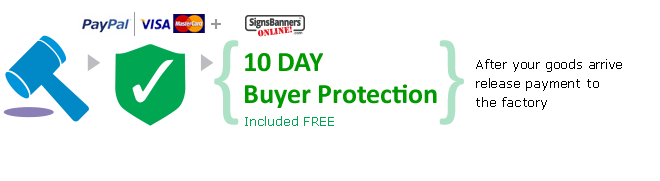
10 Day Buyer Protection = Included Free.
How Do I Digitally Approve?
Calculator > Shipping Details > Upload > APPROVE & Digital Signature {Enter Code}
Approve your artwork matched to your line items.

Just like a traditional proof, we want you spell check, look closely at your designs and check twice that you have uploaded the correct items. Then, Enter the Security Code. This becomes your 'online signature' and proceed approval. Printing begins immediately.
10 Day Buyer Protection = Included Free.
How Do I Order?
Go to Order & Upload > Input Size and Options > Add Item to Quote , then Start Order
Pressing the Add Item to Quote button creates a Line Item.

Tip: If you want quantities of the same item, change the QUANTITY field. It's cheaper.
Remember, If you have the same size banner with two different designs, click Add Item to Quote again so that when its time to upload Signs Banners Online knows you have two Line Items of same size but different artworks you can upload for each Line Item.
MORE INFO
How to Order STEP by STEP with video tutorial help.
The Order & Upload Calculator is interactive, and you can adjust your options suited to your order. Discounts are applied too. SBO is an automated system and LINE ITEMS = ARTWORK so that SBO knows 'how many' of 'which design to manufacture'.
10 Day Buyer Protection = Included Free.
How do I release payment?
via your Inbox or via your 'MyPage' click on the Release Payment to Factory button. This will release your payment held in a third party bank account.
Automatically: Your payment will be released to the factory automatically 10 days after being sent.
Also see: 10 Day Buyer Protection
Where do I find the Set Up Specifications?
The best place to find your exact specifications is the Easy Template Maker. Enter your custom size and options and it will generate your specifications including: manufacturing artboard size, fold over bleed, dpi, color mode and sewing positions.
You can also find general specifications at the Specifications page.
Also see: What is an INFO sheet?
Custom Sizes
Yes! SBO offers fully custom sizes. Go to the Order & Upload Calculator, select your product, and enter any custom width and height dimensions.
The Easy Template Maker will generate the correct file specifications for your custom size.
Inches / Metric
SBO supports both imperial (inches, feet) and metric (mm, cm, m) measurements. The calculator detects your region and defaults to the appropriate unit system.
You can also switch units in the calculator. The Easy Template Maker will show specifications in the unit system you select.
Also see: Easy Template Maker
Why a file may fail uploading
IMPORTANT Your file must be banner print ready to pass automatic upload inspections.
Common reasons a file may fail:
• Incorrect Material Over Size (MOS / fold over bleed) - file dimensions do not match your line item including fold over bleed
• Wrong color mode - use CMYK not RGB
• File too large - maximum 150mb
• Unsupported file format - use PDF, PSD, JPG, PNG or TIFF (no layers)
• Multiple pages in PDF - supply single page PDFs only
• Layers present - flatten all layers before saving
Also see: Is my file suitable?
Also see: Troubleshooting
Also see: What is banner print ready artwork?
How do I supply artwork?
Order & Upload PRINTING BEGINS
Upload ONE (1) BANNER PRINT READY FILE Per Line Item = Flattened layer .pdf @ 72dpi FULL SIZE+MOS (fold over bleed), CMYK max 150mb.
Or... Choose who will make the Banner Print Ready file...

You
Download specifications & custom template. Overlay your creative, flatten, save as pdf and upload. Follow the guides we offer and make a banner print ready file suitable for production.
You will need a professional graphics design program such as Photoshop, Illustrator, Corel etc.

Us
Attach and send your instructions to our design department. We do it all for you.
- - - OR - - -
Talk independantly with a local firm near you.
Other
Check the specifications needed
Use the Easy Template Maker and COMPARE if your artwork files match the custom specifications the template maker provides. You can input any size and the Easy Template Maker will show you the correct details you will need to successfully upload a banner print ready order.
What file formats can I use?
photoshop.pdf is the best
Use a single.pdf per line item = 1 flattened .pdf @ 72dpi FULL SIZE with +MOS(fold over bleed), CMYK max 150mb.
Other acceptable formats (background only NO layers)
.pdf .psd .psb .eps .jpg .png .tiff
Vector
Vector formats: Please note: .ai .eps .cdr are acceptable, however, these may not contain sufficient Metadata for automatic processing and may be delayed. We suggest you place, flatten and save as cmyk .pdf
Not acceptable
Indesign Users: We do not use InDesign .indd .idml We only accept PDF, JPEG and PNG, though we recommend you save or export your design in PDF format using the preset PDF/X-1a:2001. We do not use CAD .dxf .cad We do not use desktop publishing formats .bmp .pub .docx .pptx
Please note, we only accept single page PDFs, so you'll need to export each page from InDesign and upload them as separate files.
Also see: Other formats available
Also see: Is my file suitable?
Do I supply traditional trim bleed?
NO No, 'Bleed' is a traditional paper printing term that is 'trimmed away'. We use a term called 'FOLD OVER BLEED'.
We use 'Fold-Over-Bleed' = Material Over Size
Please learn more, this is important. Products made by SBO require additional size to fold over and become a hem. You must set a larger dimension suitable for your Material Over Size.
Do not set up any files with traditional bleed, marks, trim identifiers or color bars anywhere. MAKING A BANNER is NOT the SAME as paper.
 Arranging your file
Important! We employ Direct to Fabric Digital Printing (Duracoestatic) wherein... pixel perfect edges are created that DO NOT REQUIRE TRIM Markings, DO NOT REQUIRE Color bars or any other marks. The Material Over Size dimension is the outer edge that is then folded inwards to become a hem. Please read about it.
Also see: Material Over Size
Also see: Is my file suitable?
Is shipping price included?
Yes. Free Shipping Applies. (FSA) - Orders below $AUD$586.73 Free Shipping Applies
or SOME SHIPPING PAYMENT REQUIRED If an order exceeds the promoted Free Shipping value, a client may be required to pay a balance or full value. This 'Some Shipping Required' value is aside the free component. This means, the 'free' value has been deducted leaving a balance of 'some shipping'.
Calculator Shows 'Some Shipping Payment Required'
If your orders are under $AUD$586.73 value, some partial shipping may be required. This is shown at Calculator.
If your orders are over $AUD$53.78 value, some partial shipping may be required. Your order indicates heavier than standard packaging or shipping excess allowance(s) and may require more or larger cartons, pallets, crates or loaders or or higher payment to shipping company or other costs to effectively ship to you. This is shown as a value figure at Calculator. Any FSA is deducted showing you any balance due.
IMPORTANT Free Shipping T&C's
NOTE: Free shipping is NOT express shipping. Shipping companies general ETA is 3-7 days depending on your location and suitability to a destination hub. Please refer to the shipping company website for more general and localized information. We understand that your order may be deadline driven and we appreciate this element of our industry, however, shipping times are not guaranteed nor promised. Please allow sufficient time to ship out to your destination. Inadequate scheduling or delays are not reason for dispute.
Also see: How to use The Easy Template Maker
Also see: How to prepare a design for banner printing VIDEO
Also see: How To's (All)
When will my goods arrive?
Once you have made payment, we will begin production. Depending how many quantities you are ordering, normally production takes 2-4 days and shipping takes around 3-7 days. Please note this could vary as we use a third party courier for all shipping and actual times are not promised.
We understand that your order may be deadline driven and we appreciate this element of our industry, however, shipping times are not guaranteed nor promised. Please allow sufficient time to ship out to your destination. Inadequate scheduling or delays are not reason for dispute.
Also see: Tracking your order
What happens if I have a shipping problem?
IMPORTANT If you are unable to resolve shipping yourself by referring your unique tracking numbers with the shipping company, communicating with them and trying to resolve the problem yourself... contact the factory support team.
We understand that your order may be deadline driven and we appreciate this element of our industry, however, shipping times are not guaranteed nor promised. Please allow sufficient time to ship out to your destination. Inadequate scheduling or delays are not reason for dispute.
Also see: Tracking your order
What if I'm not there when the courier arrives?
Often... drivers will leave an 'attempted delivery' card advising they tried to delivery to you. OR they will update their website status. Please contact the courier service via the details they provide.
Special Circumstances: We do not provide 'Authority to Leave' documents. IF you wish special circumstances or special movements of delivery, communicate directly with the shipping company. They may charge you additional fees.
Please note The factory support team ARE NOT able to assist with altering labels, redirection or special adjustments.
Use your 'MyPage' to communicate directly with the shipping/courier company for any special requests.
Also see: Tracking your order
Also see: Can I specify a time for delivery?
How do I manage self shipping?
You will receive updates throughout the production stages and access to your special 'MyPage' where you check the status of your order and follow when ship out begins including the shipping company details and tracking numbers.
Use the shipping company ONLINE WEBSITE TRACKING FEATURES, Consignment numbers and updates. They will be able to give you delivery status updates.
Contact the shipper directly If you have any concerns regarding the delivery of your goods, you are best to contact the shipping company via their website or customer service phone numbers as they will have the best up-to-date information.
Use your 'MyPage' to communicate directly with the shipping/courier company for any requests.
Also see: Tracking your order
Also see: Can I pick up / arrange my own shipping?
What happens if my order fails quality inspection?
SBO runs 54 quality inspections on every order before shipping. If an order fails any inspection stage, the factory support team will review the issue and contact you via your inbox or 'MyPage'.
Common causes include file quality issues identified during pre-flight, material defects detected during cutting or finishing inspection, or assembly anomalies. In most cases your order will be reprinted at no extra charge.
Also see: Follow the progress
Do you put up / install the banners?
No. SBO is a wholesale supply company - we manufacture and ship directly to you. Installation is not part of our business model.
All banners include the fittings and hardware options you selected at the calculator (pole pockets, eyelets, hook and loop etc.) to assist your own installation or that of a local installer.
Also see: Terms & Conditions
What is Some Shipping Required?
Yes. Free Shipping Applies. (FSA) - Orders below $AUD$586.73 Free Shipping Applies
or SOME SHIPPING PAYMENT REQUIRED If an order exceeds the promoted Free Shipping value, a client may be required to pay a balance or full value. This 'Some Shipping Required' value is aside the free component. This means, the 'free' value has been deducted leaving a balance of 'some shipping'.
Calculator Shows 'Some Shipping Payment Required'
If your orders are under $AUD$586.73 value, some partial shipping may be required. This is shown at Calculator.
If your orders are over $AUD$53.78 value, some partial shipping may be required. Your order indicates heavier than standard packaging or shipping excess allowance(s) and may require more or larger cartons, pallets, crates or loaders or or higher payment to shipping company or other costs to effectively ship to you. This is shown as a value figure at Calculator. Any FSA is deducted showing you any balance due.
IMPORTANT Free Shipping T&C's
NOTE: Free shipping is NOT express shipping. Shipping companies general ETA is 3-7 days depending on your location and suitability to a destination hub. Please refer to the shipping company website for more general and localized information. We understand that your order may be deadline driven and we appreciate this element of our industry, however, shipping times are not guaranteed nor promised. Please allow sufficient time to ship out to your destination. Inadequate scheduling or delays are not reason for dispute.
Also see: How to use The Easy Template Maker
Also see: How to prepare a design for banner printing VIDEO
Also see: How To's (All)
What does 'banner print ready' mean?
IMPORTANT • Banner Print Ready means your file is perfectly matched to your line item and will upload correctly and pass automatic inspections for INSTANT printing.

Using automatic artboard servers, print servers and automated systems, when you upload a banner print ready file it instantly passes into the printing queue and begins production. This occurs with minimum human involment.
| # | Upload a banner print ready file | Factory | Self Manage |
|---|---|---|---|
| 1 | Preview and Approve. | Pre-Flight Checks, Insert Printing Queue | ETD Scheduling |
| 2 | Automatic Job Ticketing | Roll loaded, Printing begins. All departments begin. | 'MyPage' access, Receipt+Documents, Status Notifications, Tracking. |
| 3 | Shipping details assigned. 10 Day Buyer Protection. | 54 Quality Inspections | Watch your order as it moves around the factory and to your door. |
• Their files are automatically placed into the printing queue and printing begins without human involvement
• A banner print ready file will insert directly into the printing queue and upon next automatic material load, it will be begin production without human involvement.
• A banner print ready file is- [Finished order size +MOS(fold over bleed size)].
• A banner print ready file is optimized. This means 1:1 scale @ 72dpi CMYK Single Layer(Background) saved as .PDF high quality settings.
Also See: The number #1 thing people need to get right
Also see: How to use The Easy Template Maker
Also see: How to prepare a design for banner printing VIDEO
Also see: How To's (All)
What should I tell my Designer?
 1. Follow all instructions and specifications as per the INFO SHEET
2. Watch these videos. How to prepare a file for banner printing AND How to use the Easy Template Maker
3. Use an Easy Template to overlay your creatives and visuals.
Use the Easy Template Maker. NO Layers. Flattened files only. Single PDF per line item
• Your designer needs to create artwork suitable for banner sign printing. To send your designer the specifications, click on the Easy Template Maker, enter your custom choices > Add Item to Quote > Save and Print your Specifications Sheet (INFO SHEET) and email that Info Sheet to your designer. Encourage your designer to visit www.signsbannersonline.com Videos and Learning Center.
Recommend your designer to visit: How To's (All)
Customers: Also visit: How to give your designer instructions
Also see: How to use The Easy Template Maker
Also see: How to prepare a design for banner printing VIDEO
Also see: How To's (All)
 Do you have a dropbox?
✔Yes. You can Attach and Send files using our 'Let Us Design' drop box. (No login required)
2 Attach files, logos or creative elements.
3 Enter instructions for each element, tell the graphic designers what you want.
4 Send... The Design Department will reply soon.
Attach & Send: (Let Us Design) Files are communicated to the Design Department. Printing does NOT begin.
Order & Upload: Printing begins.
Also see: How to use The Easy Template Maker
Also see: How to prepare a design for banner printing VIDEO
Also see: How To's (All)
Can I specify a time for delivery?
No. SBO uses ground shipping during normal business hours as per shipping company policies. You will need to be in attendance during the shipping company scheduled delivery time. We advise you monitor closely the tracking stages of your order and self manage your shipping. When you order, at some stage you will have access to your 'MyPage' shipping company name, consignment details and website. Please use the shipping company website for all communications.
IMPORTANT NOTE ABOUT SHIPPING
We take all care with your shipping and are very proud of our system however, shipping is beyond our control once your parcel leaves the factory and you are purchasing a 'Wholesale Supply' of your goods with SELF-MANAGE facilities. IF you are unsure how to manage shipping and tracking do not order. The factory support team do not apply to this role. This is a wholesale supply solution not retail. Certain customer service elements have been removed from our business model including SHIP OUT MANAGEMENT. Please update your 'MyPage' often and contact the shipping company directly for all details of your order and destination. Read more here T&C's
We understand that your order may be deadline driven and we appreciate this element of our industry, however, shipping times are not guaranteed nor promised. Please allow sufficient time to ship out to your destination.
Also see: Delivery Guarantee
Also see: Track your orders - 'MyPage' VIDEO
 Sample Books. Can I have a sample?
Yes. Please fill in this form correctly and the factory support team will ship out a free sample book. Benefits: Refer to the material you want in your hand.
Free 2026 Sample Book with popular fabrics used for signage banners, displays and exhibitions.
Note: We do not provide sample proofs. All artwork design acceptance is via Instant Preview
What materials should I use?
The best material depends on your application - outdoor or indoor use, duration, and environment. We recommend ordering a free sample book to compare the popular fabrics used for signage banners, displays and exhibitions in your hand.
Visit the product pages for detailed material specifications and suitability guides for each product type.
Care & Attention
To get the most from your banner signs and displays, please follow these care guidelines:
Outdoor banners - Avoid prolonged exposure to extreme weather. When not in use, fold and store in a dry location. Wipe clean with a damp cloth.
Indoor displays - Keep away from direct sunlight to prevent fading. Clean with a soft dry cloth.
Fabric banners - Some fabric types are washable at low temperature. Check the product specifications for your material type.
Also see: Terms & Conditions
All Tech Sheets & Data
Technical data sheets are available for each product. Find specifications including material composition, weight, tensile strength, UV resistance rating, recommended dpi and file setup requirements.
Visit the product pages for individual tech sheets, or use the Easy Template Maker which automatically includes the relevant specifications for your selected product and options.
Resellers. How do I become a wholesaler / reseller?
No application needed! Immediately begin using SBO at wholesale prices and conditions. Already our international wholesale prices are reflected in the calculator.
Recommended: About Us / Our Story
Resellers. Can I login for more discounts?
No. SBO do not advertise to achieve retail sales. The wholesale prices shown at calculator are as of time of order.
Recommended Retail Price. We do not assist resellers or wholesalers to determine their price / rates schedule. If you add profit to products=Hooray! You're in business too.
Resellers. Will SBO ever contact my customers?
No. Never. Not going to happen. SBO is borne from a wholesale company with over 20 years history supplying resellers. WE NEVER contact your customer.
Modern business and the internet: We do not have influence on how a search engine lists our site and if we appear on the web it is generally to wholesalers being the prime keyword.
Records, Addresses and Contact Info: Order details are not kept. We use PayPal payment gateway. Records expire. Artwork is removed.
IMPORTANT NOTE: Shipping Labels IF you enter a direct ship out to your customer address, the shipping LABEL must have a SENDER address. ie. SBO's Address. (Customers less than 11,000 sq ft / 1000m2 per month... We do not have the facility to accept your shipping labels to adhere to parcels. Please receive goods to your address then forward on.)
Also see: Can I pick up / arrange my own shipping?
How long are the prices valid for?
All order prices are at time of order and promotions, discounts or special offers may expire.
Prices are linked to material purchase prices which may fluctuate. Prices change regularly.
How to create an estimate. Go to the Order & Upload Calculator, input the sizes and choices of your banner.
Add item to quote.
Click  'Print' field.
Your Estimate will appear.
Can I pick up / arrange my own delivery?
No. SBO do not allow direct pick up, arrange for pick up or other. When purchasing products you are purchasing from a wholesale internet based business model with automatic features. Certain business elements have been removed including 'pick up facility'.
Where is my order coming from? International or Local? SBO is a market place that automatically allocates the fastest OR cheapest OR best factory for your product/options and ship directly from a factory to you. It may not be the nearest. Locations include: USA, Europe, Asia.
SBO ship out to over 150 Countries with two (2) deliveries throughout Australia everyday. This also gives you an advantage your customers do not access the factory locally.
Where is my order coming from? International or Local?
SBO is a market place that automatically allocates orders to a printing queue by selecting the FASTEST or CHEAPEST or BEST factory for your product options. It may not be the nearest. Locations include: USA, Europe, Asia, Asia-Pacific.
SBO ship out to over 150 Countries with two (2) dispatch options throughout Australia everyday.
This also gives you an advantage as your customers do not access the factory locally.
SBO is a direct discount factory link created by designers... for designers and wholesalers and you can talk to the Factory Support Team anytime!
Also see: How long does it take to deliver?
How long does it take to deliver?
Our preferred shipping companies general ETA is 3-7 days depending on your location and suitability to a destination hub. Please refer to their website for more general and localized information.
We understand that your order may be deadline driven and we appreciate this element of our industry, however, shipping times are not guaranteed nor promised. Please allow sufficient time to ship out to your destination. Inadequate scheduling or delays are not reason for dispute.
NOTE: SignsBannersOnline are not carriers. All delivery is contract delivery via Consignment which you have undertaken when your order and by their relevant guidelines and policies.
Free Shipping: Please read how Free Shipping Applies may affect your region.
IMPORTANT NOTE ABOUT SHIPPING
We take all care with your shipping and are very proud of our system however, shipping is beyond our control once your parcel leaves the factory and you are purchasing a 'Wholesale Supply' of your goods with SELF-MANAGE facilities. IF you are unsure how to manage shipping and tracking do not order. The factory support team do not apply to this role. This is a wholesale supply solution not retail. Certain customer service elements have been removed from our business model including SHIP OUT MANAGEMENT. Please update your 'MyPage' often and contact the shipping company directly for all details of your order and destination. Read more here T&C's
Can you dropship? Can you supply unbranded or my branded product direct to my customer?
No. Order less than 11,000 sq ft (1000m2) per month. Note: The address you input becomes the shipping label. Also see Identifying Marks.
Yes. Orders above 11,000 sq ft (1000m2) per month. Bulk/Corporate customers can establish special features over time as our relationship grows. SBO is borne from experience supplying over 20 years of wholesale products to the trade and corporate markets. Other sensitive questions via LIVE CHAT.
What is drop shipping? Drop shipping is a supply chain management technique in which the retailer does not keep goods in stock but instead transfers customer orders and shipment details to either the manufacturer or a wholesaler, who then ships the goods directly to the customer.
Why are sq ft vs m2 mentioned? Materials are still purchased in sq ft terms.
Can you give me a pro forma invoice?
No. SBO offer you an estimate that you can print/save as .pdf and forward to your manager. All order prices are at time of order and promotions, discounts or special offers may expire.
How to create an estimate. Go to the Order & Upload Calculator, input the sizes and choices of your banner.
Add item to quote.
Click 'Print' field.
Your Estimate will appear.
How to access your Printable Receipt via your inbox > See attachment > Receipt. | via your 'MyPage' > Download Receipt.
(This also applies to your Statement of Wholesale Supply documents.)
What is my tax position?
SBO offer goods under the Incoterm Free Carrier 'FCA' and bulk all orders (all customers) into a major ground shipping account known as 'free shipping'. All orders you undertake include a statement of wholesale supply for which if required present to your applicable taxation agent for tax duties payable, claimable or non-action, fees or refunds.
Free Carrier (FCA). Seller arranges pre-carriage from seller's depot to the named place, which can be a terminal or transport hub, forwarder's warehouse etc. Delivery and transfer of risk takes place when the truck or other vehicle arrives at this place, ready for unloading - in other words, the carrier is responsible for unloading the goods. (If there is more than one carrier, then risk transfers on delivery to the first carrier.) In all cases, the seller is responsible for export clearance; the buyer assumes all risks and costs after the goods have been delivered at the named place.
As a wholesaler/reseller, you may be required to adhere to further obligations in your state/territory/country. Any information provided by SBO is a guide only and should not be taken as financial or taxation rulings or advice. E&EO. Seek local taxation advice pre-order.
EXTRACT from Statement of Wholesale Supply1. Except as otherwise noted the property described will be resold in the form of tangible property and that the manner any property is used for a purpose other than retention demonstration or display whilst being held for resale is tax dutiable by the resale receiver for which are not paid by the wholesale supplier being mentioned above. If the reseller is not required to hold a permit or registered to resale because the reseller is exempt or does not make sales in the state/territory applicable for such this is applied in the regular course of business and reporting the sale and paying dutiable taxes if any that may be required for local statutes and chapters are bound in that state/territory by that purchaser. A Statement of Wholesale Supply is attached with your order.
What is the taxation shown on my Invoice/Receipt? Signs Banners Online is registered in Australia. Australia uses a Goods & Services Tax rate of 10%. As a wholesaler/reseller in AUSTRALIA you may be able to claimback this amount.
SBO do not offer further taxation information. Seek your local taxation agent.
Payments. For more information RE: PAYMENTS go to How to Pay.
How to access your Printable Receipt via your inbox > See attachment > Receipt. | via your 'MyPage' > Download Receipt.
(This also applies to your Statement of Wholesale Supply documents.)
Guarantees Consumer Rights?
SBO offer guarantees and consumer rights as normally represented as wholesale buying agreements outline. As we supply over 150 countries, your regional, county/state/territory or national consumer laws may offer differing applicable statutes. Purchasing any service or product is considered to be CUSTOM WHOLESALE for which we will deliver a quality product for the price valued. Read More
End of chain consumer rights: As you are a wholesale buyer, we offer a NO Third Party Contact Policy. This means that we shall not resupply product(s) found to be a third party complaint. The business model you are using with Signs Banners Online dot com is wholesale supply to reseller(you). You must be aware that we do not assist with any third party (ie. your customer). SBO is a factory to Wholesaler/Reseller service, NOT a factory to your customer service.
PUMPERKNICKEL If you are uncomfortable purchasing wholesale do not continue. We are very proud of our factory to you service however this is a genuine wholesale business model and NO assistance is given for third parties (ie. your customers) to demand warranty claims to SBO. SBO do not assist with disputes, warranty claims, marketing you may promote or any other feature you undertake as a wholesaler/reseller.
Do you show the SBO logo? "I'm a reseller"
PLEASE READ CAREFULLY
SBO do NOT show the logo on product... HOWEVER, certain elements must have identification for shipping purposes, genuine product purposes or package identification purposes. WE RECOMMEND you ship to your address and RE-PACKAGE.
Identification may appear: • Shipping Labels • Commercial paperwork • Genuine Parts/Fittings
If you input a 'customer address' the Shipping-Label-with-Logo will represent that address. We strongly suggest you ship out to YOUR ADDRESS and repackage, remove paperwork and resend.
Do you have a showroom?
No. It's now all online. We suggest you watch a few videos produced, and look at a few image galleries and product pages to really get the look and feel of what Signs Banners Online can do for you.
If you're looking for ideas or How To's, we are also introducing a color kitchen, learning center and trade image panels.
By the way! All images you can see are 'Let Us Design' requests. WE NEVER DISPLAY your imagery. Never!
Other sensitive questions... via "Live Chat"
If you have more reseller questions, please use LIVE CHAT or send a message using the contact factory pages.
Contact Factory
We are building these now and the layout may change from time to time

